Lingofable vs Beelinguapp: Do You Need the Translation?
Beelinguapp puts the English translation beside the Spanish, which comforts more than it teaches. An honest comparison with Lingofable’s approach.
By Simon Ilincev, founder of Lingofable · Last updated September 18, 2026
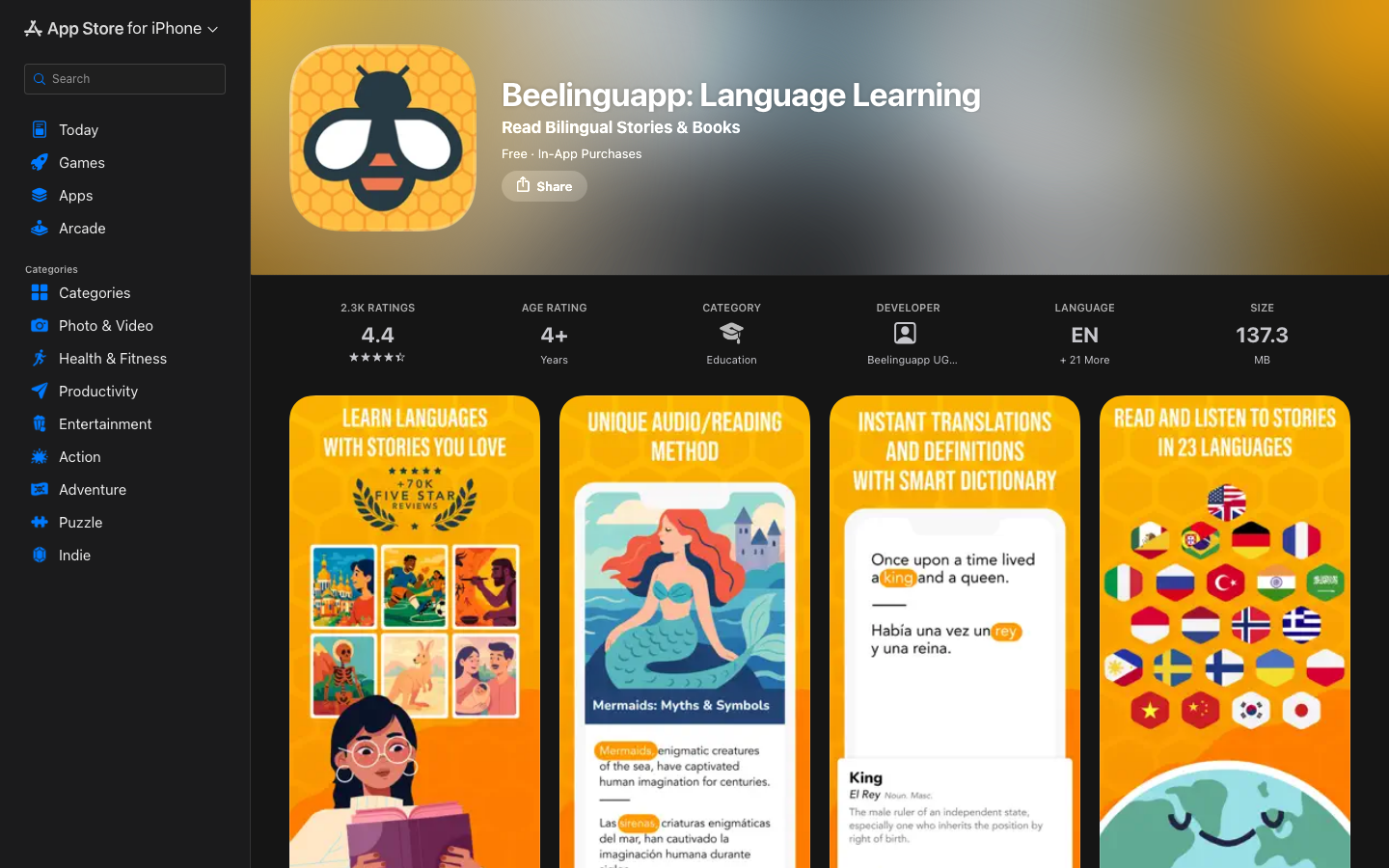
Beelinguapp and Lingofable agree on the thing most language apps get wrong: stories beat drills. There’s a reason for that. Humans have learned from stories since we huddled around fires, they’re in us deeply, and that pull is a large part of why either of these apps will carry you further than tapping word tiles ever will. Both put you in front of real narrative with audio, which already places them in a rather small club. The differences come down to a design decision and a library: Beelinguapp’s signature reading mode keeps the English translation of every sentence beside the Spanish (a toggle can hide it, but parallel text is the default and the whole pitch), and its catalog is one fixed set of texts for everyone.
I know exactly what I do when a translation sits an inch below the sentence I’m supposed to be working out, because I’ve caught myself doing it in my own learning more times than I’d like to admit: I read the English. Not on the first page, perhaps, but reliably by the third. (As Lingofable’s developer I’m hardly neutral here, so verify me against your own habits.) The whole exercise feels productive while teaching remarkably little, since the answer key sat open the entire way through.
In short
Beelinguapp is a pleasant way to follow along with bilingual texts and songs in 20+ languages, and for a nervous first month it has real charm. But if you want your reading to move your Spanish measurably, I’d argue the permanent translation column has to go. Lingofable keeps you in Spanish, at a level measured and personalized for you, with help one tap away rather than always on.
At a glance
| Lingofable | Beelinguapp | |
|---|---|---|
| Reading method | Target language only; tap for help | Parallel text by default (translation can be hidden) |
| Content | Library of 4,200+ stories, matched to your interests and level | Fixed catalog: tales, news, songs |
| Difficulty | CEFR-targeted, tracked per user | 4 coarse buckets (Kids → Advanced) |
| Vocabulary | Known-word tracking, drives your level | Glossary + basic flashcard game, no SRS |
| Languages | Spanish only | 20+ languages |
| Platforms | iOS + web reader | Mobile apps only |
| Price | Free fables; $44.99/yr Pro | Free with ads; roughly $18–50/yr on promos |
Prices and features checked September 18, 2026.
The trouble with the second column
Defenders of parallel text are right about one thing: it lowers anxiety. There’s always a lifeline, and in the very first weeks of a language that genuinely helps people start at all. The problem is what a permanent lifeline does to the effort that makes reading stick. That half-second of “wait, I almost have this word” is where acquisition happens, and an always-visible answer key removes it. You stop reading Spanish and start checking it. Even reviewers with no horse in this race note that the dual display can trip readers up once the two languages order their sentences differently.
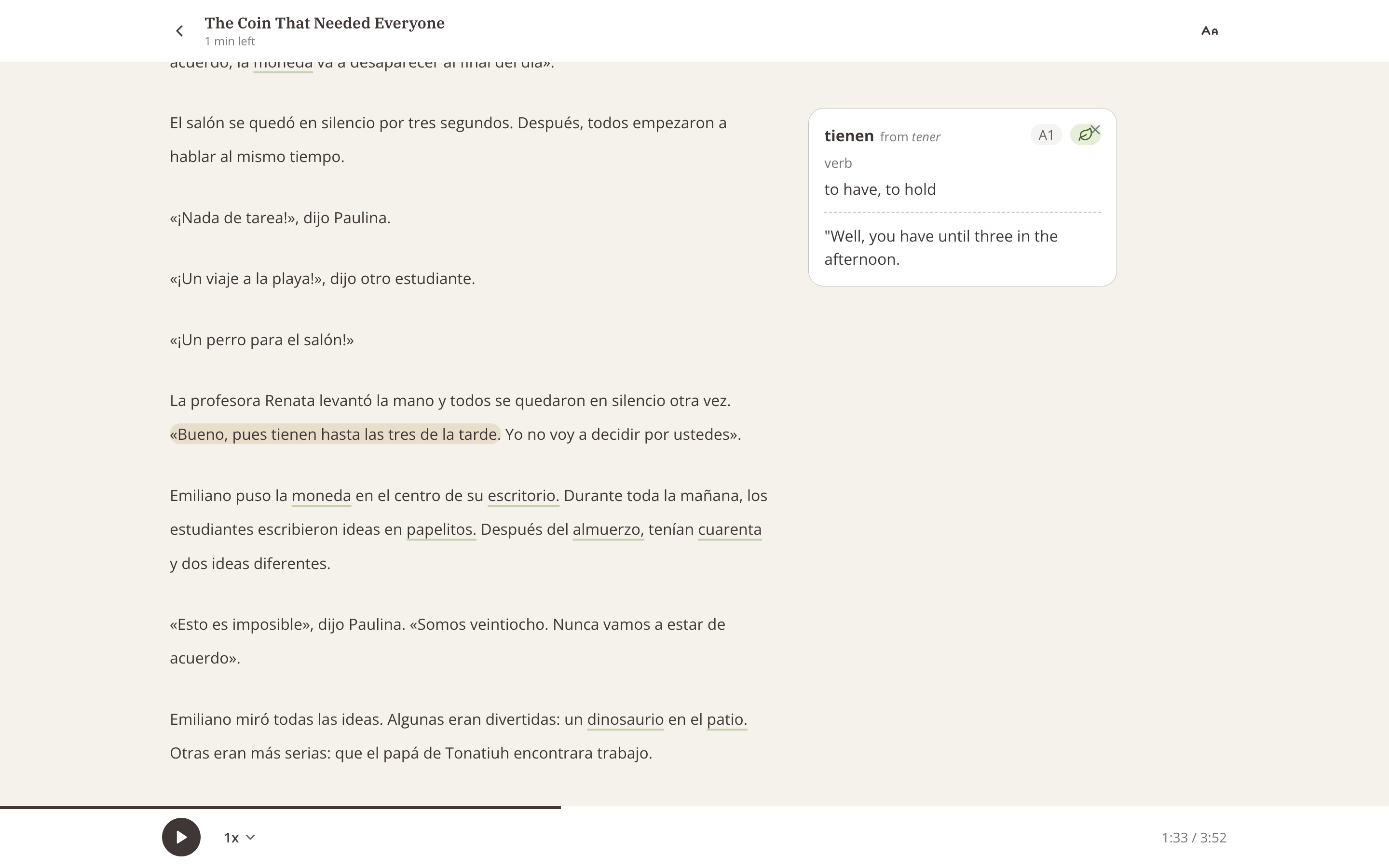
The polyglots people admire tended to read the other way. Kató Lomb, who worked through novels in a dozen-plus languages, describes in her book skipping words she didn’t know rather than surrendering the sentence to a dictionary, let alone to a running translation. To Beelinguapp’s credit, a toggle can hide the translation. But defaults are destiny in an app you open when you’re tired, and the default here is the answer key. Lingofable’s reader is built around the opposite default: you see Spanish only, and when a word or sentence won’t crack, you tap it, read the translation, and it goes away again. Since stories are matched to your measured CEFR level, you understand most sentences unaided anyway, and every tap quietly updates the app’s ledger of which words you know.
One catalog for everyone vs a library that knows you
Beelinguapp’s library is a fixed catalog sorted into four broad buckets from Kids to Advanced. In practice, this means fairy tales, classics, news, and songs for the non-child reader. The songs are a genuinely nice touch we can’t match. But four buckets is a blunt instrument (app-store reviews regularly note that “Beginner” texts can read closer to intermediate, depending on the language), and nothing in the catalog adapts to you: no per-user level, no record of which words you’ve met, and a flashcard game with no spaced repetition behind it. (Lingofable exports your words for SRS apps like Anki, if that’s your thing.)
Lingofable makes the opposite trade: 4,200+ Spanish stories written to specific CEFR bands, recommendations driven by your interests, and a level that recalculates as your vocabulary grows. Language is a continuum rather than a few fixed levels, so under the hood each story is analyzed linguistically and weighed against the words you actually know. (A teacher who tried it put it more generously than I would: “This is awesome. I would love for all of my students to use this.”) What we don’t offer is the authentic-literature corner. Neruda and news wires are Beelinguapp’s to keep, and if reading excerpts of classics matters to you at this stage, that’s a fair reason to pick them.
All in all
Genuinely get Beelinguapp if you’re reading with kids. BeKids is a sweet corner of the app, and not ground we contest: Lingofable doesn’t have children’s content, and some of our advanced stories deal with more mature themes (think PG-13). Get it too if you want low-pressure exposure to several languages at once, or if bilingual song lyrics sound like your kind of evening. It’s cheap, pleasant, and I’ve nothing bad to say about it as entertainment with a learning flavor.
But if you’re serious about Spanish, and particularly if you suspect you’ve been reading the English column rather more than you’d admit at a dinner party, I’d push you toward reading without the second column, whether with us or with a paper graded reader. With the bilingual view on, something like half your reading minutes simply aren’t happening in Spanish. I sincerely hope one of the two apps gets you reading daily either way; and if you try ours, do tell me what worked and what didn’t at team@lingofable.com, which lands directly with me and my cofounder.
Frequently asked questions
What is the difference between Beelinguapp and Lingofable?
Beelinguapp is built around parallel text, showing the full translation beside the original by default (a toggle can hide it). Lingofable shows only Spanish and reveals a translation when you tap, and adds what Beelinguapp doesn’t have: a measured per-user level, a personalized library, and vocabulary tracking that drives both.
Is parallel text reading good for language learning?
For the first nervous weeks it can be, as the lifeline lowers anxiety and gets people started. The research is less kind after that: a PLoS ONE study found native-language subtitles actively harm foreign speech perception, and my honest experience matches. The lifeline quickly becomes the reading, much like pinyin was in my own Chinese journey: a crutch that feels helpful while quietly weakening the skill it replaces. Learners who lean on parallel text heavily tend to plateau while feeling productive.
How much do Beelinguapp and Lingofable cost?
Beelinguapp is free with ads, with premium promos commonly landing between $18 and $50 a year depending on the deal. Lingofable has free fables and Pro at $6.99/month or $44.99/year.
Which app supports more languages?
Beelinguapp, easily: 20+ languages against our Spanish-only. If your target language is not Spanish, that settles it, no need to overthink.
Do either of these apps teach speaking?
Neither, really. Beelinguapp has a basic pronunciation check; Lingofable focuses on reading and listening input. For conversation you will want a tutor or exchange partner alongside either — and input first, speaking second is a perfectly respectable order to do things in.